Multi-agent agentic coding workflow tool

PopBot mascot PopBot

Agentic Coding You Can See

Run a team of AI coding agents in parallel — one per ticket, bug, or PR — each isolated in its own warm git-worktree slot, each able to build, run, and test your app end-to-end. Watch them all in live thumbnails and side-by-side multi-chat views.

Live thumbnails Multi-chat views Warm worktree slots
POPBOT · autorpg / 3 active · 2 / 3 slots
FG
ENG-20402 · server timestamps286k
20402-srv-ts · claude
Three options drafted — pick A, B, or C and I'll implement.
Library cache crash712k
20447-library · claude
⚒ git push — needs your approval.
Boss arena loadtime540k
20355-arena · codex
Done — 2,840ms → 1,220ms. Opened PR #7402.
c6ENG-20402 · server timestamps Active
Unity :5101· Server :8080· slot 1 on screen 1 · foreground
Look at ENG-20402 and propose how to add server timestamps to ability resolve packets.

The packet carries tickIndex only; the client re-derives wall-clock for the HUD — that's the root cause of the cooldown flicker. Three ways to expose a real server stamp:

bashrg "AbilityResolvePacket" Assets/ -n14 matches
Assets/Net/AbilityResolvePacket.cs+1 −0
8 public int tickIndex;
9 public ushort tickOffsetUs; // server-stamped
10 public int abilitySlot;
Why PopBot

Agentic coding is the easy part now.

The hard part is running many agents at once without chaos — keeping their work isolated so they don't step on each other, actually testing what they build, reviewing it, and never letting one quietly do something dangerous.

PopBot is the orchestration layer for that. It turns your Linear tickets and GitHub review requests into one-click agent sessions, gives each agent a real, isolated workspace — its own git worktree, and for game projects its own running app under test — runs them autonomously by default, and pulls every transcript, diff, terminal, and log into a single window.

You stay the lead: you skim the columns, approve the risky moves, and ship. It was built to drive a real production game's development with a small team — open-sourced as a reference you can fork and reshape for your own stack.

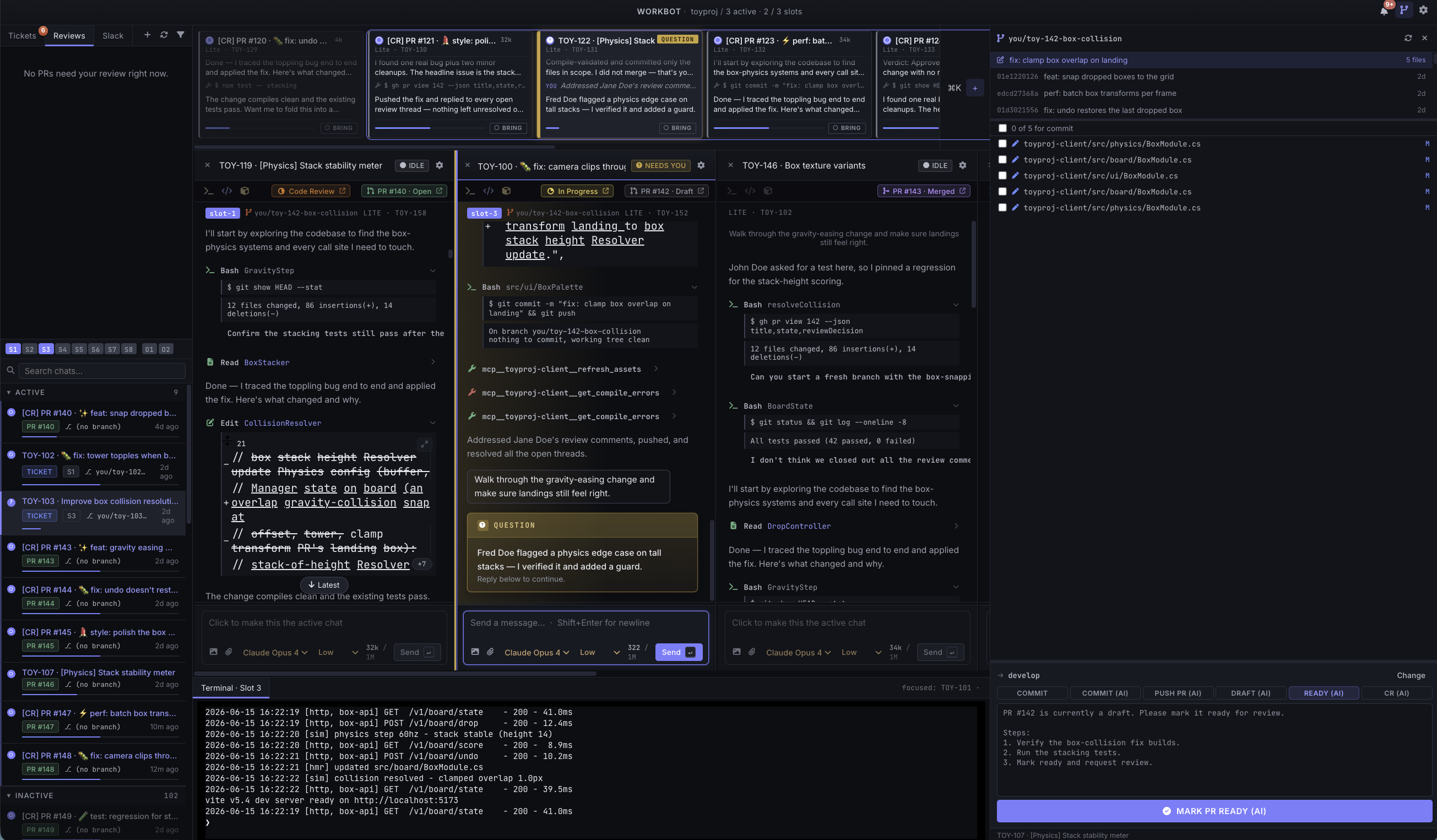
A real PopBot session — several agents working in parallel, each in its own slot.
Defining features

Built for running a fleet, not a single agent.

Multi-chat view with live thumbnails

Every open chat stays on screen — a strip of live thumbnails above side-by-side columns. Each thumbnail is a real, updating view of that chat, color-coded by state: running, done, waiting-on-you, error.

At a glance you see what every agent is doing and who needs you — and you can catch a wrong path early, redirecting before it burns time and tokens. One person supervises a whole fleet from one window.

FG
server timestamps286k
Three options drafted. Pick A, B, or C.
library cache crash712k
⚒ git push — needs you.
boss arena loadtime540k
Done. Opened PR #7402.
inventory flicker96k
Reproduced in fixture. Patching…

Warm slots for Unity development

Each working chat leases a slot — a persistent git worktree plus its own warm build state, created once and reused. For Unity, the slot keeps its own hot Library import cache and can keep the Editor running.

Switching an agent back into its slot takes seconds, not a multi-minute reimport. Ten agents run in true branch isolation without thrashing a single Unity cache.

How slots work
slot 1 · eng/20402-srv-ts
Library cache hot · Editor running · :5101
warm
slot 2 · eng/20447-library
Library cache hot · :5102
warm
slot 3 · available
ready to lease

Worktree-aware git interface

A built-in git panel scoped to each chat's own worktree: working-tree status, recent commits, and per-file diffs for exactly that branch — you're never guessing which checkout you're acting on.

One-click, templated actions — Commit, Push PR, Make ready, Address CR, Rebase onto base — send a pre-filled instruction to the agent, with ${branch} / ${ticket} / ${prnum} filled in. Review the diff, click, ship.

Assets/Net/Resolver.cs+3 −1
144 tickIndex = tick,
145 tickOffsetUs = (ushort)(NowUs() - TickStartUs(tick)),
146 abilitySlot = slot,
Push PR Commit Rebase onto base

End-to-end workflow

The whole loop in one place: your inbox (assigned tickets + PRs awaiting review) → in-progress agent work in isolated slots → GitHub (commit, push, open the PR) → code review in instant repoless chats → archive a finished chat → reopen and restart later with full history.

Click a ticket and PopBot names the branch, leases a slot, moves the ticket to In Progress, and seeds the agent — then carries it through to a merged PR and back.

Inboxticket / PR lands, ranked
In progressagent works in its slot
GitHubcommit, push, open PR
Archive & reopenresume with full history
Additional features

The details that make it trustworthy.

The real Claude Code & Codex

Each chat drives the actual agent through its official SDK — the same claude and codex CLIs, with all tools, skills, and MCP servers intact. Pick model and reasoning effort per chat.

Agents that test their own work

A slot can launch the real app — for Unity, a live Editor + sidecar server on a second display — so the agent clicks through the UI, reads logs, and verifies instead of guessing.

Persistent, archivable chats

Every chat is a durable transcript. Close it to free its slot, and reopen it later with full history intact.

Per-chat terminal & clickable code

An embedded terminal pinned to the chat's worktree, and file.ts:42 links that open straight in VS Code or Cursor.

Autonomous, never reckless

Agents auto-run safe work in their slot and pause for you on anything riskygit push, opening PRs, anything outside the worktree, network calls. Grants are per-chat, durable, revocable.

Multi-repo

Drive several repositories side by side, each with its own slot pool, color, and branch conventions.

How PopBot is different

A local cockpit for many real agents.

Most agentic tools fall into a few buckets. PopBot sits in a different spot: running many real agents in parallel, with warm build state and live human oversight.

Instead of……PopBot
One agent in a terminal or IDE — a single task in a single working tree at a timeMany agents at once, each isolated in its own warm slot, all visible as a live fleet you steer from one window
Async cloud agents (Devin, hosted Codex) — opaque and remote; submit a task, wait for a PRLocal and live — watch each agent work, catch a wrong path early, and it drives your real app for genuine end-to-end testing
DIY tmux + git worktree juggling — parallel but manual; every fresh checkout pays Unity's reimport taxManaged warm slots — reused worktrees that keep Unity's Library hot, with lifecycle, git panel, and review handled for you
Orchestration frameworks (CrewAI, AutoGen) — toolkits for building agent systemsA finished, opinionated app wired to your Linear/GitHub inbox and review loop — human-in-the-loop by design

And critically: PopBot doesn't replace Claude Code or Codex — it runs them. The exact agents you already trust, just many at a time, with orchestration, isolation, and oversight wrapped around them.

Anatomy of the workspace

Everything in one window.

PopBot UI anatomy — thumbnail strip, chat columns, terminal, and git panel

Inbox — tickets & reviews

Your Linear tickets and GitHub review requests, ranked. One click spawns a chat.

Slots

The pool of warm, isolated workspaces — a worktree plus persistent build state. A chat leases one while it works.

Chat archive

Every past chat, searchable and reopenable with full history.

Chat thumbnails

A live strip of all open chats — color-coded by status: running, done, needs-you, error.

Chats

The focused agent sessions: prose, tool calls, and inline code diffs, streaming live.

Per-chat terminal

An embedded terminal pointed at that chat's worktree, for manual commands.

GitHub panel

Working-tree status, commits, file diffs, and one-click commit / push / PR actions.

A day with PopBot

Four agents, one lead, zero thrash.

09:14 · A feature ticket

Click → it builds

A Linear ticket lands. Click it → PopBot opens a chat on you/eng-123-…, leases a slot, moves the ticket to In Progress, and hands the agent the full description. It writes the code, runs the app in its slot to verify, and pauses for your OK before pushing. You review the diff and hit Push PR.

▶ running
09:31 · A bug, in parallel

Two agents, two trees

While that's running, a bug report comes in. Spawn a second chat — its own slot, its own branch — and the two agents work simultaneously without ever touching each other's tree. The thumbnail strip shows both: one green, one blue.

✓ done
11:02 · A review request

Repoless review

A teammate's PR shows up in your Reviews tab. Click it → an instant repoless review chat opens, the agent reads the diff and the surrounding code, hunts for real bugs, and posts an inline review on GitHub — while your build chats keep going.

▶ reviewing
Next morning

Pick it back up

Close the finished chats to free their slots. Tomorrow, reopen the feature chat from the archive to address review feedback — the agent resumes with the entire conversation and its worktree intact.

↺ reopened
Requirements & install

Up and running in minutes.

  • macOS — the primary, tested platform. Portable to Windows (Electron + Node), but Windows isn't tested yet.
  • Node 20+
  • The claude and/or codex CLIs (the agent backends), plus gh and git
  • Credentials (Linear, GitHub) are stored locally on your machine — never in the repo
  • Optional: a Unity Editor for game projects; VS Code / Cursor; iTerm
# clone & install
$ git clone https://github.com/proofofplay/popbot-tool
$ npm install

# run the app in development
$ npm run dev

# build a signed .dmg
$ npm run package
Make it yours

MIT-licensed, and meant to be forked.

PopBot was shaped around one team driving one game. But the shape that made it powerful — agents, warm slots, an inbox-as-queue, an app-under-test, and a live fleet view — is general. The specifics are just defaults.

Swap the app-under-test

The Unity integration is one implementation of "let the agent run and verify the app." Replace it with your web app, your CLI, your own test harness.

Point the inbox elsewhere

Linear and GitHub are wired in, but the inbox-as-queue model is generic — adapt it to your tracker.

Rewire the git actions

Branch conventions, PR flows, and action templates are all yours to change in Preferences or in code.

Keep the core

Warm slots, persistent chats, the live-thumbnail fleet view, and the permission floor are the durable ideas worth keeping.

Documentation

Dig deeper.

Feature & Workflow GuideThe complete tour — concepts, every feature, and end-to-end workflows. Start here.
Configuration GuideSet up every Preferences panel — integrations, repos, slots, agents — with screenshots.
User StoriesThe user stories PopBot was measured against.
Core ModelThe object model — Chat, Message, Slot, AgentSession — and their lifecycles.
ArchitectureProcess boundaries, IPC, and where each subsystem lives.
DevelopmentLocal dev setup, scripts, conventions.

Run a fleet. Keep the thread.

If your team is reaching for more than one coding agent at a time without losing the thread, this is a working, opinionated starting point.